What is PyTorch .detach() method?

What is PyTorch .detach() method?
PyTorch's detach method works on the tensor class.
tensor.detach() creates a tensor that shares storage with tensor that does not require gradient. tensor.clone() creates a copy of tensor that imitates the original tensor's requires_grad field.
You should use detach() when attempting to remove a tensor from a computation graph, and clone as a way to copy the tensor while still keeping the copy as a part of the computation graph it came from.
Let's see that in an example here
X = torch.ones((28, 28), dtype=torch.float32, requires_grad=True)
y = X**2
z = X**2

result = (y+z).sum()

torchviz.make_dot(result).render('Attached', format='png')
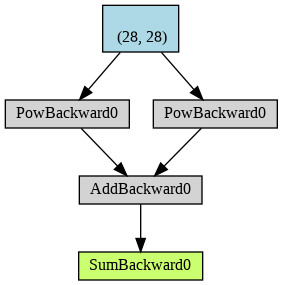
And now one with the detach.
X = torch.ones((28, 28), dtype=torch.float32, requires_grad=True)
y = X**2
z = X.detach()**2

result = (y+z).sum()

torchviz.make_dot(result).render('Attached', format='png')
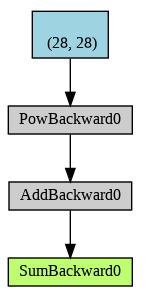
As you can see now that the branch of computation with x**2 is no longer tracked. This is reflected in the gradient of the result which no longer records the contribution of this branch
About the author
I go by theroyakash on the internet. I am a computer scientist, with research in high performance algorithms, data structures, distributed systems, and beyond. See my work searching google for theroyakash.
Comments
Join the discussionNo comments yet. Be the first to comment.


